
Thank you for your interest in our software. Registering your device is very easy, and each zCube device extension corresponds to your hardware device (see the list of supported devices below) and contains an auto-registration process.
zCube (z3) Extensions (2025-04):
SLI-PRO: z3slipro and z3slipro_lite
SLI-F1: z3slif1 and z3slif1_lite
SLI-M: z3slim and z3slim_lite
SLI-FTEC (Fanatec Conversion Kit): z3sliftec and z3sliftec_lite
SCN5 and SCN6 (Dyadic System Electric Linear Actuator): z3scn
License Registration Process
The first time the extension is loaded, it will automatically detect if the license is valid. If no license is found, the system will prompt you to register.
A donation per device (in USD only) to our non-profit foundation is required to contribute to our projects and receive your software license.
Versions of the Software
All Leo Bodnar modules come in two versions:
- Lite Version: Free for non-commercial use with limited features.
- Full Version: Unlocks all features and is available with a donation.
The Lite version is completely free for personal, educational, or non-commercial use but comes with certain limitations compared to the Full version. To enjoy the complete functionality, we recommend upgrading to the Full version through a donation.
The z3scn module requires a registration.
A professional version (z3scnpro) is available on demand. The pro version offering additional advanced features and is dedicated to custom software development, contact us.
To register connect your device:
- make sure it’s recognized by Windows (check the Devices and Printers control panel),
- Download and install the z3 module corresponding to your hardware and install it using pip install <modulename> (see the releases for more info)
- Create and run a python script to register (donation and creation of your developer account). See the documentation to create your python script.
# minimal script to register
# Load device extension and create the instance
# replace z3slipro by your device extension

import z3slipro as sli
device = sli.z3engine()

# Initialize device
if device.init():

    # Your script here

    # End of script
    device.terminate()
# minimal script to register the z3scn module
# the actuator must be configured with a COM Port (FTDI driver installed),
# recognized by Windows
import z3scn as scn
# init device with its COM port (here it is the COM port 4)
if scn.init(4):
# Your script here
# End of script
scn.terminate()
else:
print("Error: Initialization Failed!"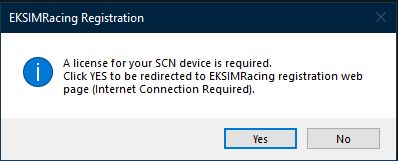
Click Yes to be redirected to our website and make your donation, then create your developer account, see the link below.
Copy the item# serial number (required for creating your developer account),
your item# serial number is on the EKSIMRacing registration web page and on your Paypal receipt.
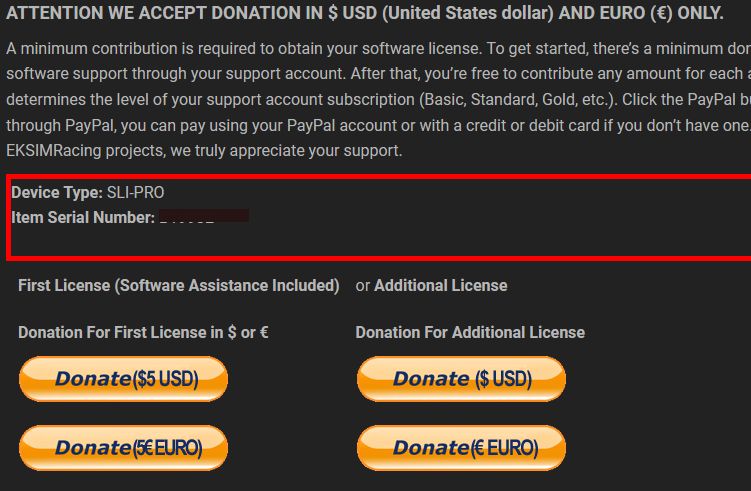
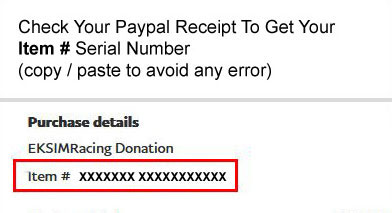
Click the Donation button to make your donation using Paypal secure service (we accept only $ USD United States dollar and € Euro)
Register your developer account
Click the REGISTER button below to create your account.
As soon as your account registration and donation are fully processed by our licensing server (within 24h max) and the license is ready to use, a notification is sent automatically to the email registered with your developer account (check your spam mailbox if you didn’t get it or login to check your pending message).
IMPORTANT: The notification is processed automatically by the system, so you will not receive any notification without a developer account.
Register your developer account to get the notification when the license is activated and to get assistance.